
Sending documents by API: A simple introduction
An API, or Application Programming Interface, is a set of rules and protocols that allows different software applications to communicate with each other. APIs define the methods and data formats that applications can use to request and exchange information. They are essential for enabling integration between different systems and services.
API stands for Application Programming Interface. In simple terms, it’s a way for two systems to talk to each other—like giving your software the ability to send instructions directly to our platform.
Instead of clicking buttons manually, your system can say:
“Here’s a document. Please send it to this customer via email.”
And our platform takes care of the rest.
Using our API, you can fully automate how business documents—like invoices, payslips, or payment reminders—are prepared and sent, saving time and reducing the risk of human error.
💭 Why Use an API?
Using the API is ideal if you:
- Generate documents automatically from your own tools (like ERP or CRM systems)
- Want to send large volumes without manual uploads
- Need real-time feedback about delivery statuses
- Prefer a fully automated workflow with little to no human interaction
How to Configure Your API in Our Platform
To get started, follow these basic steps:
- You'll need your ClientID and Secret Token.
This can be found under "general settings" in the settings page. We use OAuth, if you want to learn more on that part, check out this article. - Define your workflow.
Before you can start sending, make sure you have created a workflow. Check out this page to discover more on creating and managing workflows. - Check the documentation to find your workflow unique ID
When sending documents by API, you need to reference the workflow you wish to use. You can find the ID in the API documentation on our platform. - Test and go live
We recommend that you test your integration with different scenario's before going live.
Discover more
- Feedback on the progress of your documents can also be send back to your systems by API.
Read more about it here. - Consult our API documentation.
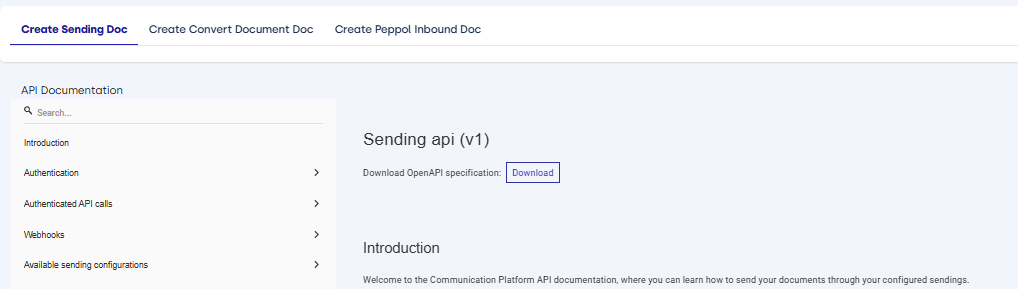
Go to the 'Help & Support' section in the bottom left corner
In the top menu, different categories for API documentation are available:

| API Rate limit: please note that API calls are limited to 500 calls par minute for authenticated users, and 100 calls per minute for unauthenticated users. |